
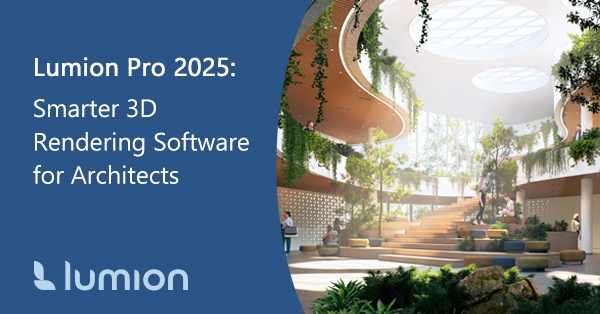
In the world of architecture and design, your ideas move fast—and your 3D rendering software should too. That’s why Lumion Pro 2025 is built to match your creativity at every phase, from early concept to final presentation. With smarter tools, faster workflows, and stunning new features, Lumion Pro 2025 helps you visualize your ideas without interruption.
Whether you’re designing for architecture, interior design, or landscape architecture, Lumion Pro 2025 brings your CAD models to life with remarkable ease and realism.
What’s New in Lumion Pro 2025?
Lumion Pro 2025 stands out as a game-changer for architects and designers seeking to bring their creative visions to life with unparalleled realism and speed in the fast-evolving world of architectural visualization. Packed with innovative features, Lumion Pro 2025 transforms complex 3D models into stunning, photorealistic renders, animations, and walkthroughs, empowering professionals to impress clients and streamline their workflow.
Here’s a quick look at the standout new features that make Lumion Pro 2025 the most powerful version of this architectural rendering software yet:
 AI Image Upscaler – Use AI upscaling to generate sharper, high-resolution ray-traced renders up to 5x faster, even up to 8K.
- Scene Inspector – Quickly find and manage objects, layers, and hierarchies in complex scenes.
- Performance Control Center – View real-time GPU/CPU stats and adjust editor settings for smoother performance.
- Fully Ray-Traced Water – Ray tracing allows you to achieve ultra-realistic water reflections that react naturally to lighting and surroundings.
- Ray-Traced Volumetric Sunlight and Fog – Add immersive atmosphere and storytelling depth to your renders.
- Education-themed Asset Collection – With 147 new educational assets and materials, you can create vibrant schools, childcare spaces, and family-focused environments.
- 68 New Nature Assets – Including 7 ultra-realistic photogrammetric trees and a Mediterranean vegetation pack.
- New Example Scenes and Styles – Jumpstart your workflow with curated templates, like the Tropical Villa and Seasons templates.
Why Architects and Designers Choose Lumion
Lumion Pro 2025 empowers architects, designers, and visual storytellers with powerful tools for fast, realistic, and intuitive rendering. Here are some of the key benefits of using Lumion for architectural visualization:
 Work Faster – Real-time rendering and seamless integration with major CAD software help you iterate quickly, saving time, money, and resources.
- Achieve Realism with Ease – Enhance your visuals using ray tracing, volumetric fog, realistic lighting, and high-quality materials to clearly communicate ideas and win over clients.
- Simplify Your Workflow – Move from CAD models to final presentations within one platform. Easily from CAD rendering to final presentation – no need for exporting between programs.
- Visualize Any Environment – Whether it’s a forest, school, urban plaza, or office, Lumion’s library of 6,900+ objects and 1,250+ materials has you covered.
- Create Compelling Design Presentations – Use preset styles and example scenes to present your ideas with clarity and consistency.
- Intuitive and Easy to Use – Designed for architects with little visualization experience, Lumion features a user-friendly interface and smooth CAD integration.
- High-Quality Visuals: From concept diagrams to client-ready renders, Lumion delivers stunning, lifelike images and animations that communicate your design intent with clarity and emotion.
- Flexible for Every Phase – Whether sketching ideas or finalizing presentations, Lumion supports your process with tools for concept development and storytelling.
- Rich Asset Library – Bring your scenes to life with realistic people, vehicles, and nature elements for immersive, context-rich visualizations.
Real-Time Rendering: Work at the Speed of Your Ideas
Lumion Pro 2025’s real-time rendering engine sets it apart from traditional visualization tools. Architects and designers can instantly see the impact of every material, lighting, and atmospheric change, enabling rapid iteration and confident decision-making. The software’s real-time preview, live scene updates, and immediate feedback allow you to design at full speed, these powerful architectural visualization tools ensure your creative process is never interrupted.
The video above shows the new built-in AI image upscaler designed to quickly transform low-resolution images into high-resolution outputs—up to 8K. This tool brings AI into your Lumion Pro workflow, allowing you to generate sharper images fast, reduce your rendering time, and boost efficiency—all without burning your hardware.
Attract High-Value Clients with Lumion
To showcase your expertise and attract high-value clients, leverage Lumion’s advanced features to create immersive, photorealistic presentations. Highlight your ability to deliver real-time architectural visualization, ray-traced water and fog, and AI-powered upscaling for ultra-high-resolution renders. Emphasize your proficiency in architectural design, sustainable architecture, and commercial projects, using location-based keywords to boost local visibility and reach clients ready to invest in premium design services. Wow clients with ray-traced volumetrics. Lumion Pro 2025 offers new ray-traced volumetric sun and fog that you can see in the video below. This feature allows you to add depth, realism, and emotion to your scenes, allowing you to easily set the perfect mood for compelling scenes.
Unlike many 3D rendering tools that require complex setups or steep learning curves, Lumion for architects stands out for its:
- Real-time rendering capabilities
- Ease of use, even for beginners
- Comprehensive content library (10,000+ assets)
- Built-in AI tools for speed and quality
- Flexible licensing with Lumion Studio (floating and named-user options)
Whether you’re coming from other architectural rendering tools or starting from scratch, Lumion 3D rendering software provides a smooth, powerful alternative. Explore Lumion Pro 2025 subscription options.
How User-Friendly is Lumion for Beginners?
One of Lumion’s biggest strengths is its intuitive design tools. Beginners benefit from a low learning curve and helpful UI.
- Drag and drop materials, objects, and lighting
- Use preset styles for professional-looking results
- Learn with included example scenes and templates
- Access a growing knowledge base and tutorials
Lumion’s intuitive tools make building scenes flexible and fast, and now, as you can see in the video below, the new flip tool provides you with even greater control.
Get Started with Lumion Pro 2025
Lumion Pro 2025 is a great push forward for architectural visualization by offering the speed, control, and quality you need to make an impact. Work smarter, render faster, and bring your ideas to life in real time.
- Try Lumion Pro 2025 Today: Request a free Lumion trial (only available for U.S. businesses) and discover how Lumion’s smarter tools, seamless workflows, and stunning results can transform your creative process. Elevate your designs, impress your clients, and bring your architectural visions to life-faster and easier than ever before.
- Explore Lumion Purchase Options: Lumion Studio, Lumion Pro, and Lumion View are available in 1-year and 3-year subscriptions.
- Limited-time promotional pricing is available on new licenses until July 31st.
- Studica accepts purchase orders from established companies, offering net 30 terms upon review and approval.
- Need help? Contact the Studica team for more information.
Bring Your Vision to Life with Lumion
With cutting-edge features and a workflow designed for modern architects, it’s never been easier to transform your designs into stunning visual stories. Explore Lumion at Studica and see how fast, intuitive rendering can elevate your next project.
Share this Post