
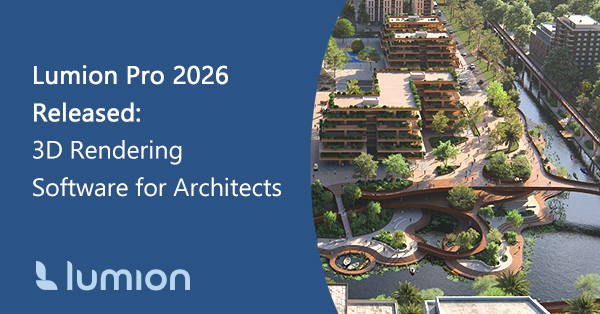
Quick Summary: Lumion Pro 2026 streamlines the tasks that often slow architects down, from populating large site contexts and cleaning section cuts to organizing views and producing high-resolution images. Rather than adding flashy features, this update refines the everyday workflow inside one of the leading 3D rendering software platforms.
New tools like Area Placement for landscapes, Fill-in Clipping Planes for section cuts, Additional Panorama Slots, and an upgraded AI Image Upscaler for up to 16K output make architectural visualization faster and more efficient. Read on to explore how these improvements help architects work smarter and finish projects with professional-quality results.
3D Rendering Software
for Faster, Smarter Workflows
Lumion Pro is professional 3D rendering software for architects and designers, turning CAD and BIM models into photorealistic images, animations, and 360° panoramas without complicated pipelines. The latest release, Lumion Pro 2026, builds on this foundation with a focus architects know well: finishing strong.
What’s New in Lumion Pro 2026?
Architectural visualization is not just about creating beautiful images; it’s about communicating design intent efficiently and clearly. Lumion Pro 2026 focuses on the everyday challenges architects face when moving from a CAD or BIM model to client-ready presentations, helping you finish projects faster without compromising quality.
Tackling Key Visualization Challenges
Architects often encounter three recurring issues when preparing visualizations:
-
Repetitive setup slows progress. Filling outdoor spaces with trees, plants, and other site elements can take hours.
-
Section visuals require cleanup. Open geometry in cut views often needs post-processing in other software.
-
Deliverables multiply across large projects. Multiple viewpoints, panoramas, and high-resolution outputs can quickly overwhelm workflows.
Architects often spend hours populating landscapes, refining section cuts, and managing multiple project outputs. From expansive site plans to intricate section perspectives, Lumion Pro 2026 tackles these common bottlenecks in architectural visualization. Each new tool is designed to streamline your workflow, letting you focus on design and storytelling rather than repetitive setup.
Lumion Pro 2026 Highlights
From landscaping to high-resolution panoramas, Lumion Pro 2026 introduces tools that streamline common visualization bottlenecks, so you can focus on design, storytelling, and client communication.
| Feature / Update | Challenge Solved | How It Helps |
|---|---|---|
| Area Placement Tool | Manual placement of landscapes and site elements |  Define a surface or draw a custom boundary and populate thousands of nature assets at once. Adjust density, spacing, variation, and terrain alignment quickly for courtyards, large site plans, or outdoor scenes. Define a surface or draw a custom boundary and populate thousands of nature assets at once. Adjust density, spacing, variation, and terrain alignment quickly for courtyards, large site plans, or outdoor scenes. |
| Fill-in Clipping Planes | Messy, unfinished section visuals | 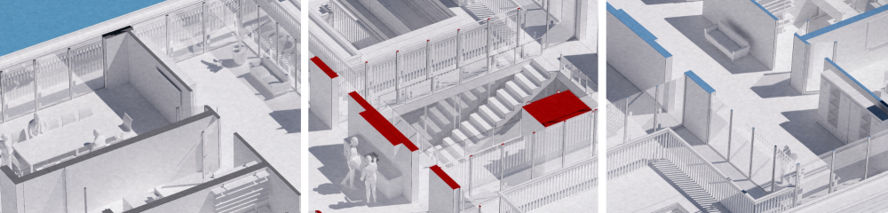 Automatically cap cut geometry with a solid color, copied material, or custom texture for clean, professional section perspectives directly in Lumion. Automatically cap cut geometry with a solid color, copied material, or custom texture for clean, professional section perspectives directly in Lumion. |
| New and Refreshed Assets | Limited variety and inconsistent detail in scenes |  Adds 73 new photogrammetric nature assets, 31 new growth-stage trees, and 96 refreshed nature assets, plus 69 updated urban items. Provides more variety and consistent quality across the scene, from large trees down to ground layers, improving close-range detail and overall realism. Adds 73 new photogrammetric nature assets, 31 new growth-stage trees, and 96 refreshed nature assets, plus 69 updated urban items. Provides more variety and consistent quality across the scene, from large trees down to ground layers, improving close-range detail and overall realism. |
| New Example Scenes and Templates | Blank starting points slow onboarding |  Provides ready-to-use example scenes and templates so users can start closer to a finished project. Reduces setup time and makes repeatable workflows easier for high-rise developments, interiors, suburban areas, and nature compositions. Provides ready-to-use example scenes and templates so users can start closer to a finished project. Reduces setup time and makes repeatable workflows easier for high-rise developments, interiors, suburban areas, and nature compositions. |
| Additional Panorama Slots | Limited viewpoints for large projects | 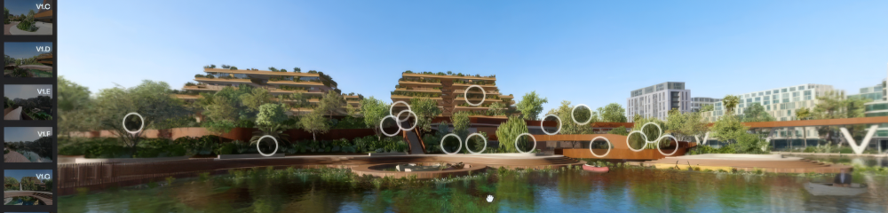 Increase panorama slots from 10 to 300 per project, organized into sets. Upload to Lumion Cloud for structured, navigable presentations of multi-building developments. Increase panorama slots from 10 to 300 per project, organized into sets. Upload to Lumion Cloud for structured, navigable presentations of multi-building developments. |
| Improved AI Image Upscaler | Time-consuming high-resolution output |  Upscale images up to 4X for 16K resolution (15,360 × 8,640), maintaining detail for print boards, banners, or competition visuals without rerendering. Learn more about AI Upscaler. Upscale images up to 4X for 16K resolution (15,360 × 8,640), maintaining detail for print boards, banners, or competition visuals without rerendering. Learn more about AI Upscaler. |
| Import PBR Materials with LiveSync | Material adjustments require repeated imports | 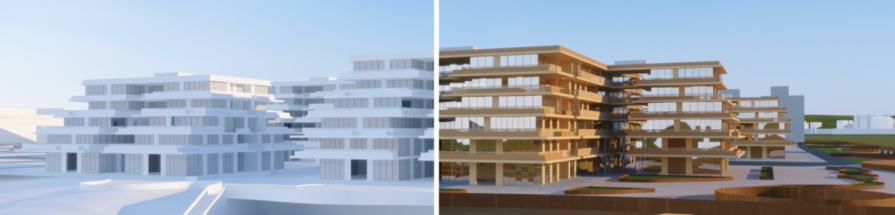 Updates PBR materials from Revit, SketchUp, or Archicad directly in Lumion in real-time, keeping model and render in sync. Updates PBR materials from Revit, SketchUp, or Archicad directly in Lumion in real-time, keeping model and render in sync. |
| Streamlined Lumion Cloud Organization | Disorganized project outputs | 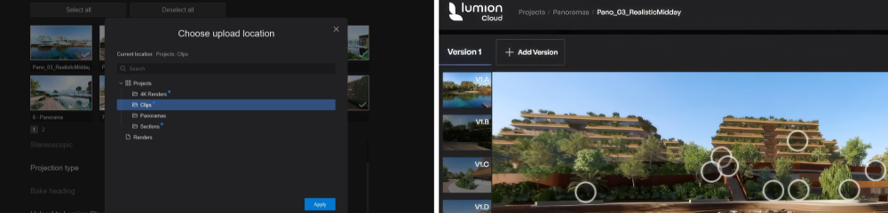 Create folders directly in Lumion Cloud during upload to organize multiple views, phases, and project iterations for easier client sharing. Create folders directly in Lumion Cloud during upload to organize multiple views, phases, and project iterations for easier client sharing. |
Together, these updates let architects spend less time on repetitive setup and post-processing and more time on design, storytelling, and client communication. Lumion Pro 2026 is about clarity, speed, and delivering polished results efficiently, exactly what architects need when deadlines are tight.
Lumion Tools for Every Stage of Design
From initial sketches to client-ready presentations, Lumion’s suite of tools supports every stage of the design process. Lumion View, Lumion Pro, and Lumion Cloud work together to help architects create, visualize, and collaborate efficiently, accelerating projects without slowing your creative flow. For the ultimate workflow, Lumion Studio combines all three tools in a single solution.
| What It Is | Key Benefits | |
|---|---|---|
|
|
Lumion View
A lightweight, real-time rendering plugin for your modeling workflow. |
Visualize early-stage designs instantly, adjust lighting and materials, and iterate without leaving your modeling software. |
 |
Lumion Pro
Full-featured real-time visualization software for photorealistic renders, animations, and 360° panoramas. |
Gain complete control over context, realism, and output quality, creating presentation-ready visuals quickly and efficiently. |
 |
Lumion Cloud
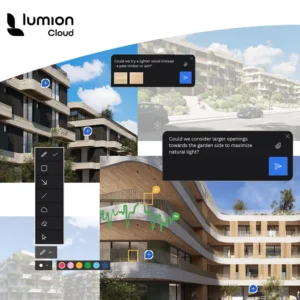
A visual-first collaboration platform for sharing and reviewing renders. |
Streamline feedback and approvals, keep projects organized, and communicate design intent clearly with clients and teams. |
 |
Lumion Studio
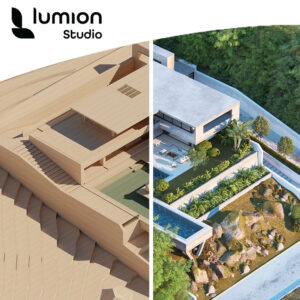
Combines Lumion Pro, Lumion View, and Lumion Cloud, giving architects a single solution to visualize, iterate, and collaborate seamlessly. |
Accelerate your workflow with a single solution for visualization, iteration, and client collaboration. |

- Availability: Lumion Pro 2026 is available as a free upgrade for current subscribers, with system requirements unchanged from Lumion 2025.
- Lumion is available in the USA through Studica. View Purchase Options.
- Note: Projects saved in 2026 cannot be opened in earlier versions.
- Lumion View for Revit and Lumion View for SketchUp are currently available. There are plans to expand compatibility with additional CAD and BIM software in future updates.
Frequently Asked Questions
Is Lumion Pro 2026 available now?
Yes. It’s available as a free upgrade for Lumion Pro and Lumion Studio subscribers.
Can I try Lumion before purchasing?
Yes. Businesses in the USA can request a Lumion Pro trial through Studica at www.studica.com/lumion-free-trial.
Note: Studica is not authorized to provide trials for students.
Can students get a free Lumion license?
Yes. Students can request a free license directly from Lumion at lumion.com/product/students.
What is the maximum output resolution?
Up to 16K using the 4X AI upscaling mode.
Did the Lumion Pro system requirements change?
No. System requirements remain the same as the previous version.
How many panoramas can I create?
Up to 300 panoramas per project.
Can I open Lumion 2026 files in older versions?
No. Projects saved in Lumion Pro 2026 cannot be opened in earlier versions.
Experience Faster, Smarter Rendering
Architectural visualization is about more than realism; it’s about communicating ideas clearly and efficiently. Lumion 2026 Pro refines the workflow between model and presentation, focusing on practical improvements that save time and elevate output quality.
If you’re evaluating professional 3D rendering software, a free trial of Lumion Pro is available for businesses in the USA.
Request a Lumion Pro Trial. It’s the best way to experience how the latest release supports real architectural workflows, from concept through final presentation.
Share this Post