
Quick Summary: If you’re a college student studying electronics or engineering, you’re likely to encounter both NI Multisim and LabVIEW in your coursework. But which option is right for your needs this semester – the Multisim Circuit Design Suite Student Edition or the NI myDAQ Bundle that includes both LabVIEW and Multisim? This guide breaks down the key features, use cases, and benefits of each to help you decide which NI student option makes the most sense for you.
Multisim or LabVIEW? Here’s the Difference
- NI Multisim is a SPICE-based electronic circuit design and simulation tool.
- NI LabVIEW is a graphical programming platform used for data acquisition, test automation, and system control.
Both are widely used in industry and education. Whether you’re focused on hardware interaction or circuit simulation, understanding the distinction between LabVIEW and Multisim is helpful. We will take a closer look at each of them and then look deeper into the NI student offerings available for these powerful tools.
What Is NI Multisim?
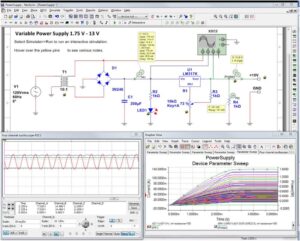
 Multisim is a powerful circuit simulation software designed for students, educators, and engineers. Built on SPICE simulation, it allows users to design, test, and analyze electronic circuits. No physical prototype required.
 Key Features:
- Drag-and-drop schematic capture
- Real-time SPICE simulations
- Extensive component libraries
- PCB layout integration with Ultiboard
- Supports analog, digital, mixed-signal, and power electronics
- Seamless integration with LabVIEW, NI ELVIS, and myDAQ
Ideal for education because it helps visualize circuit behavior and simplify complex electronic theory.
What Is NI LabVIEW?
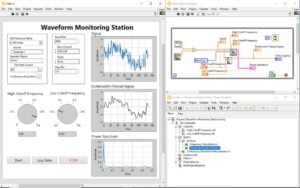
 LabVIEW (Laboratory Virtual Instrument Engineering Workbench) is a graphical programming platform used primarily for data acquisition (DAQ), instrument control, industrial automation,as well as test and measurement systems. It uses a visual programming language (“G” language) that makes it easy to build systems by connecting functional blocks instead of writing code line by line.
 Core Functions:
- Collect and process data from sensors
- Automate lab experiments or manufacturing tests
- Build custom interfaces and dashboards
- Control instruments like oscilloscopes or signal generators
Engineers use LabVIEW in industries like aerospace, automotive, and manufacturing to automate complex systems and validate designs.
How They Work Together
LabVIEW and Multisim are often used together to simulate and test electronics in a full engineering workflow:
- Multisim simulates virtual circuit behavior.
- LabVIEW, along with myDAQ, collects real-world signals and automates testing.
- Paired with NI ELVIS, students can compare simulated results with real measurements.
Do You Need Multisim Student Suite or NI myDAQ Bundle?
Below is a comparison of the two main NI software packages available to students through Studica: the Multisim Circuit Design Suite Student Edition and the myDAQ Student Bundle with LabVIEW & Multisim.
NI Multisim Circuit Design Suite Student Edition
This all-in-one EDA (Electronic Design Automation) solution for designing, simulating, and testing electronic circuits combines Multisim 14.3.1 and Ultiboard PCB Design Software. It’s ideal for coursework in analog, digital, and power electronics.
Why Students Love It:
- Simplifies complex theory through visual simulation
- Teaches industry-standard SPICE simulation
- Includes Multisim Live access, allowing you to simulate circuits anytime, anywhere.
✅ Best for students focused only on circuit simulation without LabVIEW.
NI myDAQ Student Bundle with LabVIEW & Multisim
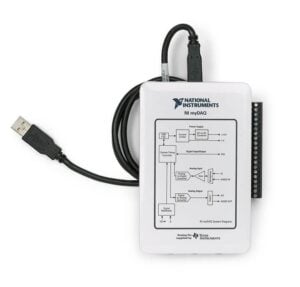
NI myDAQ is a portable USB-powered data acquisition device. For this student offering, it is bundled with LabVIEW and Multisim. It also includes 2 analog I/Os, 8 digital I/Os, a built-in digital multimeter (DMM), and all necessary accessories.
 Perfect for:
- Circuit design and validation
- Real-time signal measurement
- Data acquisition projects
✅ Best if you need both LabVIEW and Multisim.
💡 Tip: Some colleges and universities offer the NI Academic Volume License (AVL), which gives access to the full NI software suite. Check with your school’s IT department or software distribution center.
NI Student Software Bundle Comparison
| Feature / Tool | NI Circuit Design Suite | NI myDAQ Bundle |
|---|---|---|
| Main Focus | Circuit simulation & PCB design | Data acquisition, instrument control & simulation |
| Includes LabVIEW | No | Yes |
| Includes Multisim | Yes | Yes |
| Hardware Included | No | Yes, NI myDAQ device |
| Best For | Electronics & theory students | Hands-on labs, validation, and automation |
| Simulation Type | SPICE-based virtual simulation | Real-time measurement + simulation |
| Programming Required? | No | Yes (LabVIEW graphical programming) |
| Industry Tools Included | Ultiboard PCB design | DMM, DAQmx drivers, ELVISmx support |
| Included Software | Multisim 14.3.1 + Ultiboard | LabVIEW + Multisim + DAQmx drivers |
| Included Accessories | N/A | USB cable, DMM probes, audio cable, case |
| Online Access | Yes, Multisim Live | No, installed software |
| Common Use Case | Analog/digital circuit coursework | System design, sensor integration, automation labs |
| Price Range | Lower cost option | Higher (includes hardware + LabVIEW) |
Frequently Asked Questions
Are LabVIEW and Multisim the same?
No. LabVIEW is used for system-level programming and automation, while Multisim is used for electronic circuit simulation and design. They complement each other but serve different purposes.
What is Multisim used for in college?
To simulate, design, and test circuits and reinforce theoretical concepts in electronics courses.
What is LabVIEW used for in college?
For hands-on learning in data acquisition, automation, instrument control, and real-world system testing, often with actual lab hardware.
Is Multisim free for students?
NI offers a Multisim Student Edition, which is often included in software bundles or available at a discounted rate for students. Some schools include it in course materials or offer it via site licenses.
Is LabVIEW free for students?
Like Multisim, NI offers a LabVIEW Student Edition, which is often included in software bundles or available at a discounted rate for students and may be provided through school licenses.
What’s included in the myDAQ Student Bundle with LabVIEW and Multisim?
- NI myDAQ device
- NI LabVIEW
- NI Multisim
- USB cable, DMM probes, audio cable
- NI DAQmx, NI ELVISmx drivers
- Reusable storage tray and setup cards
What’s included in the NI Circuit Design Suite Student Edition?
- Multisim 14.31.1
- Ultiboard PCB Design Software
Can you use Multisim on any device?
Yes, with Multisim Live, you can simulate circuits via a web browser on nearly any device.
Conclusion
If you’re starting an electronics or engineering course this semester, these are two essential tools for enhancing your understanding and boosting your practical skills. Whether you’re simulating circuits or collecting real data from experiments, these platforms are designed to boost your understanding and develop your hands-on technical skills.
Share this Post