Filters
Preferences
Search

STEM BOT Pro Kit

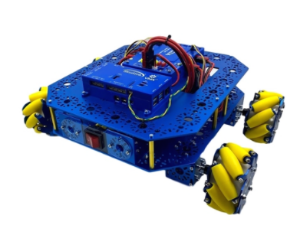
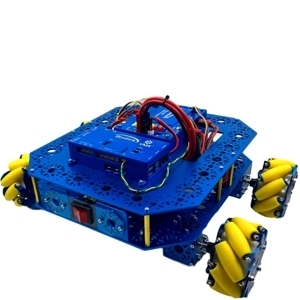
The STEM BOT Pro Kit from Studica Robotics is a powerful STEM learning tool designed to build a pushbot robot with a length of 17", width of 14.5", and height of 7" from our high-quality, structurally sound, and safe robot parts. This STEM Robot Build Project is an excellent introduction to robotics in STEM education.


This robot kit specially priced and includes $1,439 in parts. It offers an effective, hands-on method to integrate critical thinking, problem-solving, and collaboration skills with your students. Accessories can be added to the base kit to enhance classroom learning. Instructional build materials are included, and the kit comes unassembled. The parts list and build instructions are in the tabs below. Note: The color of the Omni wheels included is subject to change based on availability.

MFR Part #: 70226
$899.00
Ship to
*
*
Shipping Method
Name
Estimated Delivery
Price
No shipping options
In stock

Why Robotics for STEM Education?

Our comprehensive robotics building platform of safe, versatile, durable robot parts and kits are ideal for use in your STEM classroom.  The STEM BOT Pro Kit includes controllers, structure, hardware, motion components and build instructions to equip you with what you need to get started with your design builds.  This unique kit answers the question, Why Robotics for STEM Education?  Here is how you can incorporate mobile robotics technology into your STEM classroom:

Teach Programming Skills:

Students can apply valuable programming skills to their intelligent robot with Java and C++ to program a robot’s movements, actions, and interactions. Begin with simple commands and gradually introduce more advanced programming concepts as your students gain proficiency and confidence.

Integrate Robotics Instruction into your STEM Lesson Plans:

Projects and activities incorporating robotics instruction into your existing STEM lesson plans can reinforce the concepts taught in science, mathematics, engineering, and technology. Students can apply theoretical knowledge to real-world problems and challenges with robotics build designs.

Encourage Exploration and Experimentation:

Provide opportunities for your students to explore and experiment with robotics through open-ended challenges, design projects, and classroom competitions. Encourage creativity and innovation by allowing students to design, build, and modify their robots to achieve specific goals or objectives.

Facilitate Collaborative Learning:

To encourage collaboration and teamwork among students, projects can be initiated with activities requiring groups of two to four individuals to work together to solve problems using robotics designs. Encourage communication, cooperation, and a division of tasks to facilitate and effectively achieve common objectives.

Emphasize Critical Thinking Skills:

Utilizing robotics challenges and activities can develop a student's critical thinking skills and critical thinking abilities. Present real-world problems or scenarios that require students to analyze, strategize, and implement solutions using robotics principles and techniques.

Cross-Curricular Connections:

Robotics activities and projects integrated across multiple subjects and disciplines can demonstrate the interdisciplinary nature of STEM education. Connections between robotics and topics such as physics, biology, geography, and computer science provide a holistic learning experience.

Assess Student Learning:

Assess student learning and progress through formative and summative measurements that evaluate their understanding of robotics concepts, programming skills, and ability to apply knowledge to solve problems. Use rubrics, quizzes, projects, and presentations to assess student performance and provide feedback for improvement.

Promote Reflection and Iteration:

Encourage your students to reflect on their experiences, successes, and challenges with their robotics projects and build designs. Facilitate discussions and debriefs to help students identify lessons learned, areas for improvement, and strategies for future development of their projects.

Student Work:

Highlight your students' robotics projects and accomplishments through presentations, demonstrations, and classroom competitions. Recognize achievements and their efforts to further their learning and engagement with STEM and robotics.

Integrating mobile robotics into your STEM curriculum with the STEM BOT Pro Kit and the Studica Robotics platform, you can create an engaging and interactive learning environment that empowers students to develop essential STEM skills and competencies while fostering creativity, innovation, and collaboration.

STEM BOT Pro Kit - Parts List

(Download to View STEM BOT Parts List as PDF)

Note: 3D CAD files for all parts are available at www.studica.com/studica-robotics-resources

Controllers included in the STEM BOT Pro Kit:

  • VMX Robotics Controller 
    • The Studica Robotics VMX Robotics Controller can be used an a Robot Control System or Vision/Motion processor, supporting Java and C++.  The controller integrates the navX-IMU, Gigabit Ethernet, USB3.0 ports and built-in Wifi and Bluetooth.
    • Highly-integrated, inexpensive, WiFi-enabled, multi-core Linux computing platform with lots of USB IO for expansion.
    • 32-bit ARM Microcontroller incorporating sophisticated I/O and digital communications engines
    • Low-cost MEMs Inertial Measurement Units (IMUs)
    • Powerful software providing rich libraries and tools for developing robot control software in C++, Java
    • CAN bus for high-speed, real-time communication between devices
  • Titan Quad Motor Controller 
    • The Studica Robotics Titan Quad Motor Controller is a powerful, 4-channel CAN-based motor controller with a built-in fuse-box (for DC motors up to 20A).

Build Guide: How to Build a Robot with the STEM BOT Pro Kit

The STEM BOT Pro Kit allows students to explore the possibilities of STEM and mobile robotics in various applications from basic to advanced concepts. 

These build instructions will walk you through the steps of building the STEM BOT Pro robot.

Download to View STEM BOT Pro Build Guide as a PDF.

Download to View STEM BOT Pro Kit Parts List as a PDF.

About the VMX Robotics Controller

As the “brain” of a robot, the VMX Robotics Controller is a powerful, versatile Linux-based robot controller that offers compatibility with programming languages including Java, C++, Python, and LabVIEW, along with support for ROS. Integrated with the NavX-IMU and combined with the Titan Quad Motor Controller, the VMX acts as the powerful “brain” of your robot. Capable of programming for both tele-operated and autonomous controls. It also houses an integrated NavX IMU (Inertial-Measurement-Unit) for advanced movement performance in tele-op and autonomous driving.

Helpful Resources: Example of Code used for the VMX 

This guide will go over an example project from Studica Robotics github, using the VMX. The example code can be found here: https://github.com/studica, in the WorldSkills-Example-Projects repository under the Popular Repositories.

Troubleshooting for VMX: Updating Firmware

Certain cases may require the firmware to be updated for the VMX to improve functionality or fix any bugs. To do so, use the following instructions on our WorldSkills resources page: https://docs.wsr.studica.com/en/latest/docs/VMX/update.html

A firmware update should be performed in case there are any issues with deploying your project to the VMX or issues with the connection between the driver station app and the VMX/Titan.

VMX: Channel Block

Connector Block

Connector Type

Location on VMX

Flex DIO Header

3-pin PWM-style

Left-side Top

High Current DIO Header

3-pin PWM-style

Left-side mid

Analog Input Header

3-pin PWM-style

Left-side bottom

Comm DIO Connectors

4-pin JST GH

Bottom-left

Flex DIO Connectors

4-pin JST GH

Bottom-middle

CAN Connector

2-wire Weidmuller

Bottom-right


About Titan Quad Motor Controller:

The Titan Quad Motor Controller is a 4 channel CAN-based motor controller. Combined with the VMX, the Titan acts the Power Distribution Panel (PDP) for your robot, primarily for the VMX.

Titan: Map of Ports and Inputs

1. Power input. Input requires a 12VDC battery, and two ports are available connected in parallel. Both ports can be used for increasing the capacity or as a battery in, battery out.

2. Power output. Outputs 12VDC out to other devices such as, VMXpi or Servo Power Block.

3. Voltage indicators. There is a reverse power indicator (red) that will light up if the voltage is connected in reverse. The other two indicators display the voltage rails 5V and 3.3V.

4. Fusebox. Before voltage can be applied to the motors or power outputs (2), an appropriate fuse must be inserted into the box. Motors take 20A fuses, and power outputs take 5 - 15A fuses.

5. RGB Status Light.

6. DFU USB - used to communicate with the computer for updates and configuration.

7. CAN-BUS Input - High side (yellow) and Low side (green) inputs.

8. M1 - Motor 1 output.

9. M0 - Motor 0 output.

10. M3 - Motor 3 output.

11. M2 - Motor 2 output.

12. Boot - used only when an error occurs, and Titan cannot communicate with the computer and needs a firmware upgrade.

13. NeoPixel - addressable LED output

14. DotStar - addressable LED output

15. Pin 13/ L for LED microcontroller

16. RX/TX - LEDs for microcontroller

17. LED i2c - com port for microcontroller

18. LED USB - used to communicate with the computer for uploading code.

19. Encoder port - Quadrature encoder input

20. Limit H - High limit switch input. (Limits are pulled high and use hardware debouncing)

21. Limit L - Low limit switch input. (Limits are pulled high and use hardware debouncing)

Watch the Video Tutorial: Building a Robot with STEM BOT Pro Kit

Follow these step-by-step instructions to build a robot using the STEM BOT Pro Kit from Studica Robotics. This project involves constructing a two-wheel drive pushbot robot with dimensions of 17" in length, 14.5" in width, and 7" in height, using our high-quality, structurally sound, and safe components. This build is an excellent introduction to robotics, allowing you to explore STEM education through mobile robotics and its various applications.

Write your own review
  • Product can be reviewed only after purchasing it
  • Only registered users can write reviews
*
*
  • Bad
  • Excellent

Why Robotics for STEM Education?

Our comprehensive robotics building platform of safe, versatile, durable robot parts and kits are ideal for use in your STEM classroom.  The STEM BOT Pro Kit includes controllers, structure, hardware, motion components and build instructions to equip you with what you need to get started with your design builds.  This unique kit answers the question, Why Robotics for STEM Education?  Here is how you can incorporate mobile robotics technology into your STEM classroom:

Teach Programming Skills:

Students can apply valuable programming skills to their intelligent robot with Java and C++ to program a robot’s movements, actions, and interactions. Begin with simple commands and gradually introduce more advanced programming concepts as your students gain proficiency and confidence.

Integrate Robotics Instruction into your STEM Lesson Plans:

Projects and activities incorporating robotics instruction into your existing STEM lesson plans can reinforce the concepts taught in science, mathematics, engineering, and technology. Students can apply theoretical knowledge to real-world problems and challenges with robotics build designs.

Encourage Exploration and Experimentation:

Provide opportunities for your students to explore and experiment with robotics through open-ended challenges, design projects, and classroom competitions. Encourage creativity and innovation by allowing students to design, build, and modify their robots to achieve specific goals or objectives.

Facilitate Collaborative Learning:

To encourage collaboration and teamwork among students, projects can be initiated with activities requiring groups of two to four individuals to work together to solve problems using robotics designs. Encourage communication, cooperation, and a division of tasks to facilitate and effectively achieve common objectives.

Emphasize Critical Thinking Skills:

Utilizing robotics challenges and activities can develop a student's critical thinking skills and critical thinking abilities. Present real-world problems or scenarios that require students to analyze, strategize, and implement solutions using robotics principles and techniques.

Cross-Curricular Connections:

Robotics activities and projects integrated across multiple subjects and disciplines can demonstrate the interdisciplinary nature of STEM education. Connections between robotics and topics such as physics, biology, geography, and computer science provide a holistic learning experience.

Assess Student Learning:

Assess student learning and progress through formative and summative measurements that evaluate their understanding of robotics concepts, programming skills, and ability to apply knowledge to solve problems. Use rubrics, quizzes, projects, and presentations to assess student performance and provide feedback for improvement.

Promote Reflection and Iteration:

Encourage your students to reflect on their experiences, successes, and challenges with their robotics projects and build designs. Facilitate discussions and debriefs to help students identify lessons learned, areas for improvement, and strategies for future development of their projects.

Student Work:

Highlight your students' robotics projects and accomplishments through presentations, demonstrations, and classroom competitions. Recognize achievements and their efforts to further their learning and engagement with STEM and robotics.

Integrating mobile robotics into your STEM curriculum with the STEM BOT Pro Kit and the Studica Robotics platform, you can create an engaging and interactive learning environment that empowers students to develop essential STEM skills and competencies while fostering creativity, innovation, and collaboration.